Releases & Environments
Manage the complete release lifecycle with CI/CD automation, environment promotion, and quality gates.
Overview
M3 Forge provides a unified release pipeline for deploying workflows, agents, and processors across environments. The release system ensures:
- Consistent deployments with versioned artifacts
- Quality gates to prevent broken code from reaching production
- Environment isolation between development, staging, and production
- Rollback capability for quick recovery from issues
- Audit trail for compliance and accountability
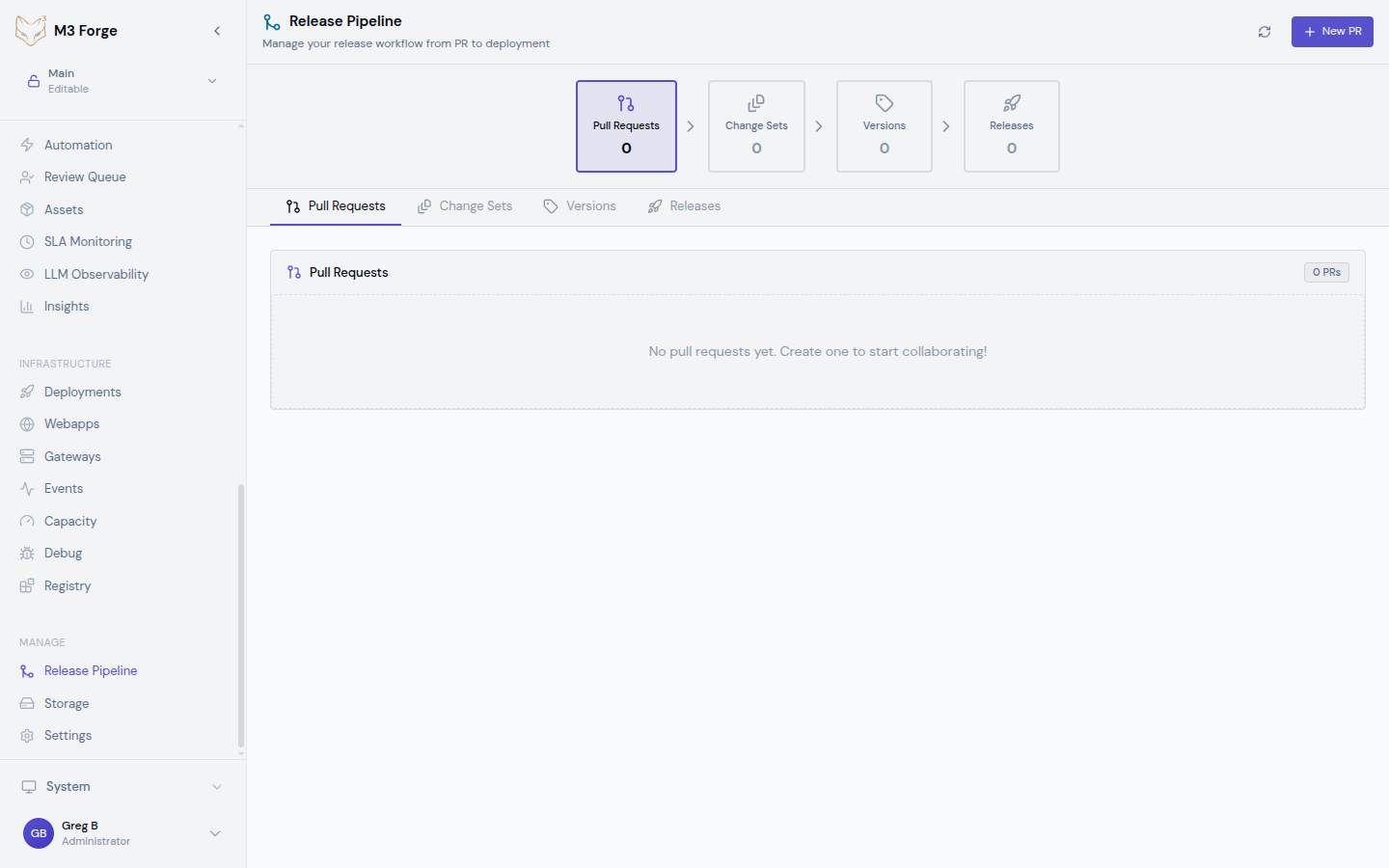
All releases follow a structured 4-stage pipeline from pull requests through production deployment.
Release Philosophy
M3 Forge treats AI workflows as production software:
- Version control - All workflow definitions stored in Git
- Code review - Pull requests required for changes
- Automated testing - Quality gates run before promotion
- Staged rollout - Deploy to staging before production
- Observability - Full monitoring of deployed workflows
This approach brings software engineering discipline to AI operations.
4-Stage Release Pipeline
The release pipeline consists of four stages:
1. Pull Requests
Developers propose changes via Git pull requests. Each PR includes:
- Workflow definition changes (DAG JSON)
- Agent configuration updates
- Processor modifications
- Documentation
Pull requests trigger automated checks and require peer review before merging.
2. Change Sets
Merged PRs are grouped into change sets that represent logical units of work. A change set might include:
- Multiple workflow updates
- Agent configuration for those workflows
- Shared processor dependencies
Change sets enable deploying related changes together atomically.
3. Versions
Change sets are packaged into versioned releases using semantic versioning:
- Major (v2.0.0) - Breaking changes to workflow interfaces
- Minor (v1.3.0) - New workflows or backward-compatible features
- Patch (v1.2.1) - Bug fixes and performance improvements
Each version is immutable and can be deployed to any environment.
4. Releases
Versions are deployed to environments as releases. Each release tracks:
- Version being deployed
- Target environment (dev, staging, production)
- Deployment timestamp
- Deployment status (pending, in-progress, succeeded, failed)
- Rollback capability to previous version
Environment Model
M3 Forge supports multiple isolated environments:
| Environment | Purpose | Stability | Data |
|---|---|---|---|
| Development | Feature testing, experimentation | Unstable | Synthetic test data |
| Staging | Pre-production validation | Stable | Production-like data |
| Production | Live user-facing workflows | Highly stable | Real customer data |
Each environment has:
- Isolated database - Separate PostgreSQL schema or database
- Independent gateways - Dedicated Marie-AI backend instances
- Environment variables - Secrets and config specific to environment
- Access controls - Role-based permissions for who can deploy
Environments can share infrastructure (database server, S3 storage) while maintaining logical isolation through schemas and namespaces.
Versioning Strategy
M3 Forge uses semantic versioning (semver) for workflows:
Version Format
v<major>.<minor>.<patch>[-<prerelease>][+<build>]

Examples:
- v1.0.0 - Initial stable release
- v1.1.0 - New workflow added
- v1.1.1 - Bug fix
- v2.0.0-beta.1 - Pre-release breaking change
- v1.2.3+20240319 - Release with build metadata
When to Bump
Major version:
- Workflow input/output schema changes (breaking API)
- Removal of nodes or connections
- Behavior changes that affect downstream consumers
Minor version:
- New workflows added
- New optional nodes in existing workflows
- Backward-compatible enhancements
Patch version:
- Bug fixes
- Performance optimizations
- Documentation updates
Tagging
Versions are Git tags pointing to specific commits:
# Create version tag
git tag -a v1.2.0 -m "Release v1.2.0: Add invoice classification workflow"
git push origin v1.2.0
M3 Forge automatically creates versions from tags pushed to the repository.
Key Features
Atomic Deployments
All changes in a version are deployed together. Either:
- All workflows and agents deploy successfully, or
- Nothing is deployed (automatic rollback on failure)
This prevents partial deploys that leave the system in an inconsistent state.
Rollback
If a release causes issues, quickly rollback to the previous version:
- One-click rollback from the Release Pipeline UI
- Preserves data - Only reverts workflow definitions, not execution history
- Instant activation - Previous version immediately becomes active
Rollback only reverts workflow definitions. Database schema changes must be handled separately with migration rollback scripts.
Deployment Approval
Configure manual approval requirements for production releases:
- Reviewers - Designated team members who can approve
- Approval count - Number of approvals required (e.g., 2 approvers)
- Timeout - Auto-reject if not approved within time limit
This adds human oversight to critical deployments.
Getting Started
Deployment Workflow
A typical release workflow:
- Develop - Create workflow in dev environment
- Test - Validate with synthetic data and automated tests
- Pull Request - Submit PR with workflow changes
- Review - Team reviews DAG definition and test coverage
- Merge - PR merged to main branch
- Create Version - Tag commit as v1.2.0
- Deploy to Staging - Release v1.2.0 to staging environment
- Staging Validation - Run smoke tests with production-like data
- Deploy to Production - Release v1.2.0 to production after approval
- Monitor - Watch metrics and SLAs for regressions
Access Control
Role-based permissions control who can perform release actions:
| Role | Pull Requests | Create Versions | Deploy to Dev | Deploy to Staging | Deploy to Production |
|---|---|---|---|---|---|
| Developer | ✓ | ✗ | ✓ | ✗ | ✗ |
| Maintainer | ✓ | ✓ | ✓ | ✓ | ✗ |
| Admin | ✓ | ✓ | ✓ | ✓ | ✓ |
Configure roles in Settings → Team → Access Control.
Compliance and Auditing
All release activities are logged for compliance:
Audit Events
- Version created - Who created, when, which commits included
- Deployment started - Who initiated, target environment, version
- Deployment completed - Success/failure, duration, artifacts deployed
- Rollback executed - Who triggered, reason, previous version restored
- Approval granted/denied - Who reviewed, decision, timestamp
Audit Queries
View audit trail in Admin → Audit Log or query programmatically:
# Get all production deployments
curl -H "Authorization: Bearer $TOKEN" \
  "http://localhost:3500/api/audit?action=deployment&environment=production&start=2024-03-01"
Compliance Reports
Generate reports for SOC 2, ISO 27001, or internal audits:
- Change log - All workflow modifications with approval chain
- Deployment history - When/what/who deployed to production
- Access log - Who accessed production environment and when
Next Steps
- Configure environments for dev, staging, and production
- Set up the release pipeline with Git integration
- Define quality gates to enforce standards
- Learn how to publish workflows to environments