Processors
Processors are the intelligence layer of M3 Forge, transforming raw documents into structured, actionable data. They power document understanding through classification, extraction, splitting, layout analysis, and summarization using Generative AI and machine learning models you can train on your own data.
Why Processors Matter
Modern document processing requires more than simple parsing. Processors provide:
- Data Extraction — Pull structured fields from unstructured documents
- Document Classification — Identify document types automatically (invoices, contracts, forms, etc.)
- Smart Splitting — Break multi-document files into logical segments
- Layout Analysis — Understand document structure and vendor-specific format variations
- Summarization — Generate concise summaries for short and long documents
All processors are powered by Generative AI. Custom processors support training on your own data, so models learn from your specific document types and business logic — with as few as 10 examples.
Processor Types
M3 Forge supports five custom processor types:
| Type | Description | Use Cases |
|---|---|---|
| Custom Extractor | Identify and extract specific data from your documents | Invoice line items, contract terms, form values, table data |
| Custom Classifier | Group your documents into categories | Document routing, type detection, topic classification |
| Custom Splitter | Identify document boundaries in a large file | Batch processing, scan separation, email attachments |
| Custom Layout | Classify documents by layout variation, such as vendor-specific formats | Multi-vendor invoices, form templates, layout-dependent extraction |
| Summarizer | Generate summaries for short and long documents | Document digests, executive summaries, content previews |
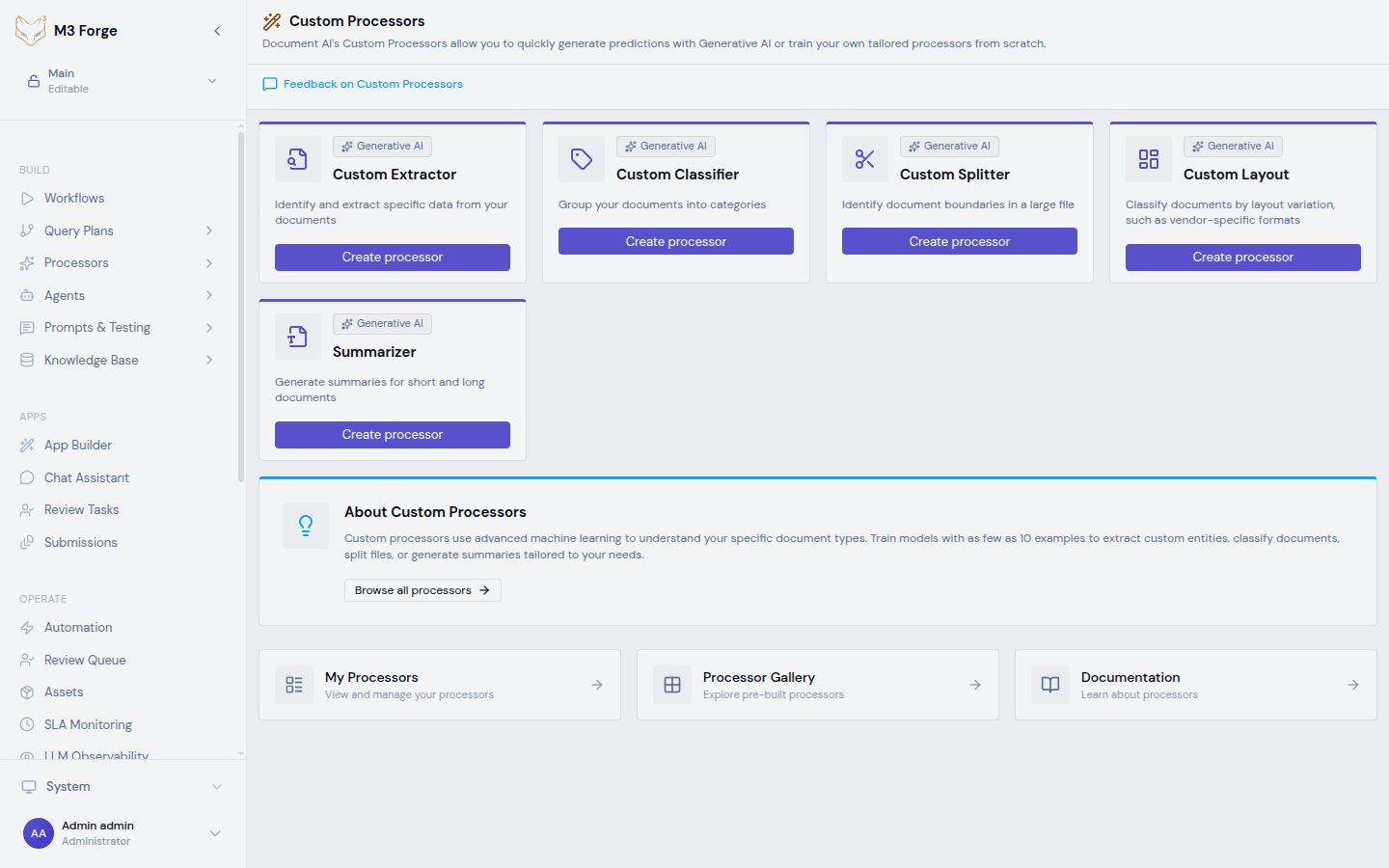
All processor types are tagged as Generative AI and integrate seamlessly with workflows. Use processors as workflow nodes to build end-to-end document intelligence pipelines.
Navigation
The Processors section in the sidebar provides three views:
| Page | Path | Purpose |
|---|---|---|
| Custom Processors | /processors/custom | Create new custom processors from the five type templates |
| Processor Gallery | /processors/gallery | Browse pre-built processors organized by category |
| My Processors | /processors/my-processors | View and manage your created processors |
Processing Pipeline
A typical document processing pipeline combines multiple processor types:
- Classification — Identify document type
- Splitting — Separate individual documents from batch files
- Layout Analysis — Understand structure and vendor-specific formats
- Extraction — Pull structured fields
- Summarization — Generate document summaries
- Validation — Human-in-the-loop review if needed
Processors handle the heavy lifting. Workflows orchestrate the pipeline.
Training Custom Processors
All custom processor types support training on your data:
- Create Processor — Select type and name your processor
- Import Training Data — Upload example documents
- Label Examples — Annotate documents with ground truth
- Train Model — Launch training jobs with your labeled data
- Evaluate Performance — Review metrics and confusion matrices
- Deploy — Activate trained models for production use
Training happens in M3 Forge’s labeling interfaces. No code required.
Training data quality matters more than quantity. Start with as few as 10 representative examples and iterate. Diverse, well-labeled examples produce better models than thousands of similar documents.
Pre-Built Processors
Beyond custom processors, M3 Forge includes pre-built processors for common document types:
| Category | Description | Examples |
|---|---|---|
| General | Ready-to-use processors for common document tasks | Document OCR, Form Parser, Layout Parser |
| Specialized | Domain-specific schematized processors | Invoice Parser, Receipt Parser, Bank Statement Parser, Pay Slip Parser, Identity Document Proofing, US Driver License Parser, US Passport Parser, Utility Parser |
Browse all available processors in the Processor Gallery.
Processor Lifecycle
Processors follow a versioned lifecycle:
- Draft — Initial configuration, not yet trained
- Training — Model training in progress
- Ready — Trained and ready to deploy
- Active — Currently deployed in production
- Archived — Retired from active use
Each training run creates a new version. Roll back to previous versions if needed.
Next Steps
Explore processor capabilities:
Custom Processors
Create and train processors on your own documents
Processor Gallery
Browse pre-built processors and deploy ready-to-use models
Annotators
Configure labeling interfaces for training data
Training
Launch training jobs and evaluate model performance
Integration Points
Processors integrate with:
- Workflows — Use processors as workflow nodes for automated pipelines
- HITL — Route low-confidence predictions to human review
- Knowledge Base — Extract entities for semantic search indexing
- Agents — Provide structured data for AI agent reasoning
Learn more about building document intelligence pipelines in the Workflows section.