Agent Orchestration
Coordinate multiple agents to solve complex tasks that exceed the capabilities of single agents. M3 Forge provides orchestration patterns for sequential pipelines, parallel execution, hierarchical delegation, and dynamic routing.
Why Orchestrate Multiple Agents?
Specialization
Single agents struggle with tasks requiring diverse expertise. Orchestration enables:
- Research agent gathers data
- Analyst agent processes findings
- Writer agent formats results
Each agent excels at its specialty instead of being mediocre at everything.
Parallelization
Distribute work across multiple agents for faster completion:
- Translate document to 5 languages simultaneously (5 translation agents)
- Analyze 100 customer reviews in parallel (10 sentiment agents)
- Generate multiple content variants for A/B testing (3 writer agents)
Error Isolation
If one agent fails, others continue working. Orchestration handles retries, fallbacks, and partial results gracefully.
Scalability
Add more worker agents to handle increased load without changing orchestration logic.
Orchestration Patterns
Sequential Pipeline
Agents execute in order, each consuming the previous agent’s output:
Input → Agent A → Agent B → Agent C → OutputExample: Content Pipeline
- Research Agent: Search web for topic data
- Summarizer Agent: Condense findings to key points
- Writer Agent: Generate blog post from summary
- Editor Agent: Polish for publication
When to use:
- Multi-stage data transformation
- Each step depends on previous results
- Linear workflow with clear handoffs
Configuration:
orchestration:
  type: sequential
  agents:
    - id: research_agent
      output_to: summarizer_agent
    - id: summarizer_agent
      output_to: writer_agent
    - id: writer_agent
      output_to: editor_agent
    - id: editor_agent
Parallel Fan-Out
One agent delegates work to multiple specialists simultaneously:
          → Agent B (Spanish)
Input → → Agent C (French)
          → Agent D (German)
Example: Multi-Language Translation
- Dispatcher Agent: Receives English document
- Parallel execution:
- Spanish Translation Agent
- French Translation Agent
- German Translation Agent
- Aggregator Agent: Combines all translations
When to use:
- Independent subtasks
- No dependencies between worker agents
- Need to reduce total execution time
Configuration:
orchestration:
  type: parallel
  dispatcher: dispatcher_agent
  workers:
    - spanish_translator
    - french_translator
    - german_translator
  aggregator: aggregator_agent
Leader-Worker
Leader agent coordinates workers, distributes tasks, and aggregates results:
         ┌→ Worker A →┐
Leader → ├→ Worker B →┤ → Leader (aggregate)
         └→ Worker C →┘
Example: Customer Review Analysis
- Leader Agent: Receives 1000 reviews, splits into 10 batches
- Worker Pool (10 agents): Each analyzes 100 reviews
- Leader Agent: Aggregates sentiment scores and themes
When to use:
- Large volume of similar tasks
- Need dynamic load balancing
- Workers are interchangeable
Configuration:
orchestration:
  type: leader_worker
  leader: coordinator_agent
  worker_pool:
    - sentiment_agent_1
    - sentiment_agent_2
    - sentiment_agent_3
  pool_size: 10
  load_balancing: round_robin
Dynamic Routing
Route requests to specialized agents based on task characteristics:
                 ┌→ Code Agent (if code question)
Input → Router → ├→ Research Agent (if factual query)
                 └→ Creative Agent (if brainstorm)
Example: Multi-Domain Helpdesk
- Router Agent: Analyzes incoming question
- Route to specialist:
- Technical Agent (code, architecture, debugging)
- Business Agent (pricing, sales, partnerships)
- General Agent (everything else)
When to use:
- Diverse input types requiring different expertise
- Need to optimize cost (route simple queries to cheap models)
- Agent specialization improves quality
Configuration:
orchestration:
  type: dynamic_routing
  router: router_agent
  routes:
    - condition: "topic == 'code'"
      agent: technical_agent
    - condition: "topic == 'business'"
      agent: business_agent
    - default: general_agent
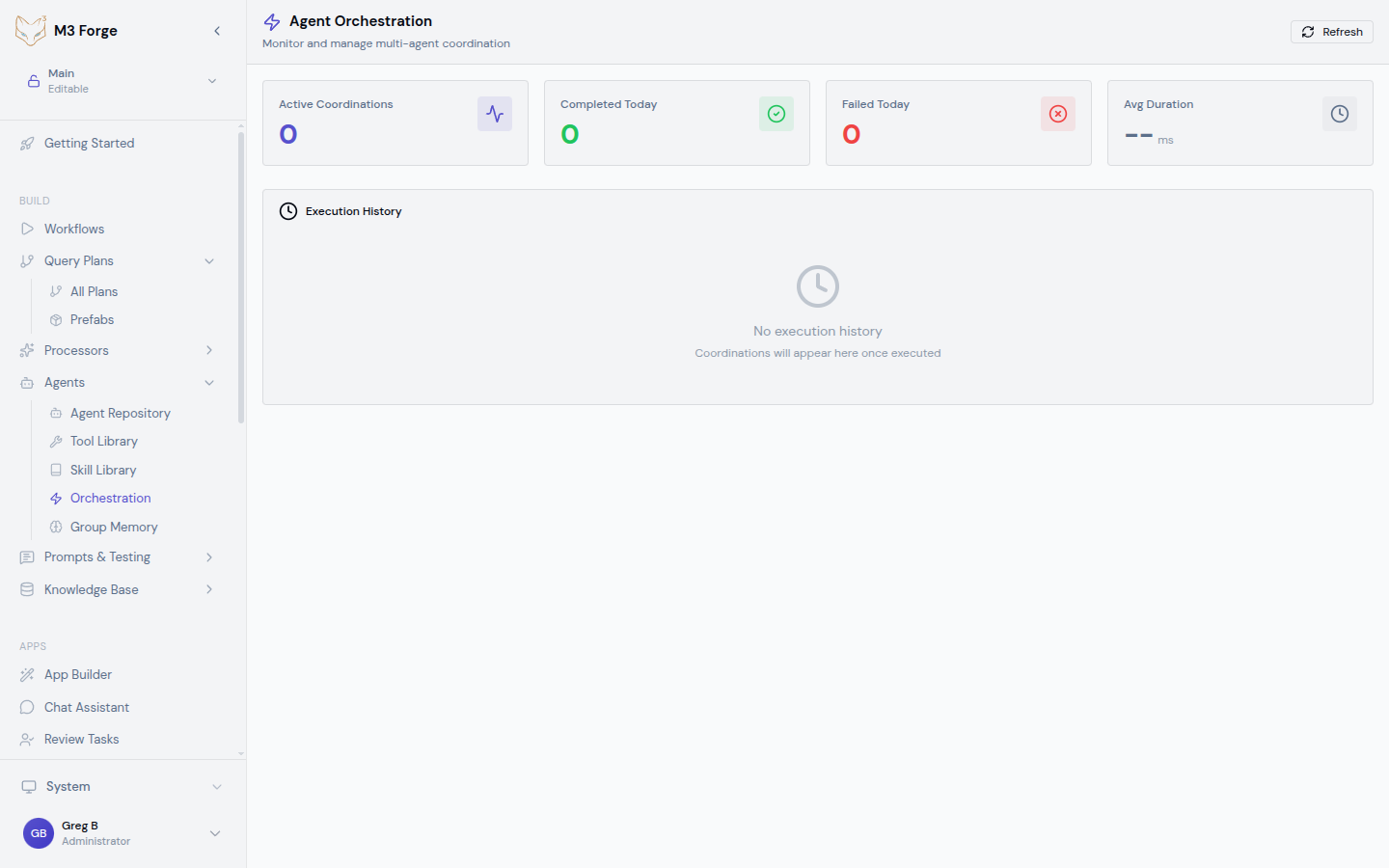
Orchestration Dashboard
Monitor active and historical orchestrations:
Real-Time Status
The Orchestration Dashboard displays:
- Active coordinations — Currently running workflows
- Agent states — Which agents are busy, idle, or errored
- Execution timeline — Visual timeline of agent handoffs
- Performance metrics — Latency, throughput, error rates
Metrics Cards
Key performance indicators:
| Metric | Description |
|---|---|
| Active Coordinations | Number of currently running orchestrations |
| Completed Today | Successful completions in last 24 hours |
| Failed Today | Failures in last 24 hours |
| Avg Duration | Mean execution time across all orchestrations |
The dashboard auto-refreshes every 10 seconds to show real-time progress. Click “Refresh” for immediate updates.
Execution History
View past orchestrations with filters:
- Time range (last hour, day, week, custom)
- Status (success, failed, partial)
- Orchestration type (sequential, parallel, etc.)
- Specific agents involved
Click any execution to see detailed logs, intermediate outputs, and performance breakdown.
Creating an Orchestration
Define the Workflow
Map out the coordination pattern:
- Identify agents needed
- Determine dependencies (which agent outputs feed into others)
- Choose orchestration pattern (sequential, parallel, leader-worker, routing)
Configure in UI
Navigate to Agents → Orchestration → Create New
Fill in configuration:
- Name — Descriptive identifier
- Pattern — Select from dropdown (sequential, parallel, etc.)
- Agents — Assign agents to roles (leader, workers, etc.)
- Error handling — Retry policy, fallback behavior
- Timeout — Max execution time before cancellation
Test with Sample Input
Click “Test Run” and provide sample input. Review:
- Which agents execute and in what order
- Intermediate outputs at each stage
- Total execution time
- Any errors or warnings
Deploy
Once testing confirms correct behavior, click “Deploy”. The orchestration is now available for:
- Direct invocation via API
- Embedding in workflows
- Scheduled execution
Advanced Features
Conditional Branching
Route execution based on intermediate results:
orchestration:
  type: conditional
  steps:
    - agent: validator_agent
      next:
        - condition: "output.valid == true"
          agent: processor_agent
        - condition: "output.valid == false"
          agent: error_handler_agent
Use case: Route to different agents based on validation results, sentiment scores, or classification labels.
Retry and Fallback
Handle failures gracefully:
orchestration:
  error_handling:
    retry:
      max_attempts: 3
      backoff: exponential
    fallback:
      - agent: backup_agent_1
      - agent: backup_agent_2
If primary agent fails, retry up to 3 times with exponential backoff. If still failing, try fallback agents.
Partial Results
Continue execution even if some agents fail:
orchestration:
  type: parallel
  partial_results: true
  min_success_rate: 0.7
If 7 out of 10 parallel agents succeed, aggregate their results and return partial output instead of failing the entire orchestration.
Human-in-the-Loop
Pause orchestration for human review:
orchestration:
  steps:
    - agent: draft_agent
    - approval: human_review
      timeout: 3600  # 1 hour
    - agent: publish_agent
After draft_agent completes, pause for human approval. Resume execution once approved or timeout if no response.
Human-in-the-loop is critical for high-stakes tasks (financial decisions, legal documents, customer communications). Always validate AI outputs before downstream consequences.
Coordination Strategies
Synchronous Coordination
Wait for all agents to complete before proceeding:
A → B → C (B waits for A, C waits for B)Pros: Guaranteed correct order, simple to reason about Cons: Slower (no parallelism), bottlenecks if one agent is slow
Asynchronous Coordination
Agents execute as soon as their inputs are ready:
A → B
  ↘ C (C starts as soon as A finishes, doesn't wait for B)
Pros: Faster (maximize parallelism) Cons: Complex dependencies, potential race conditions
Stream Processing
Agents process data as it arrives (no waiting for full completion):
A (produces stream) → B (processes items as they arrive)Use case: Real-time data pipelines, live transcription, incremental results
Monitoring and Debugging
Execution Logs
View detailed logs for each agent in an orchestration:
- Input received
- Tools called
- Intermediate reasoning
- Output produced
- Errors or warnings
Logs are timestamped and correlated across agents for easy debugging.
Performance Profiling
Identify bottlenecks:
- Agent execution time — Which agent is slowest?
- Queue wait time — How long do tasks wait before execution?
- Network latency — Delays in inter-agent communication
Optimize by upgrading slow agents to faster models or increasing worker pool size.
Error Analysis
When orchestrations fail, view:
- Failure point — Which agent encountered the error?
- Error message — What went wrong?
- Input state — What data caused the failure?
- Retry history — How many retries occurred?
Use this information to fix agent configuration or adjust orchestration logic.
Best Practices
Design for Failure
Do:
- Set realistic timeouts (agents can get stuck)
- Configure retries with exponential backoff
- Define fallback agents for critical paths
- Return partial results when possible
Don’t:
- Assume all agents will succeed
- Use infinite retries (prevents cascading failures)
- Ignore error logs (they contain valuable debugging info)
Optimize for Latency
Do:
- Use parallel execution when possible
- Cache expensive agent outputs
- Use faster models for non-critical agents
- Pre-warm agent pools (avoid cold starts)
Don’t:
- Run everything sequentially
- Use premium models for simple tasks
- Ignore queue wait times in metrics
Monitor Resource Usage
Do:
- Track token consumption per orchestration
- Set budget limits to prevent runaway costs
- Scale worker pools based on load
- Archive old execution logs to save storage
Don’t:
- Run unlimited orchestrations (risk cost explosion)
- Ignore memory usage (agents can leak memory)
- Keep all logs forever (storage costs add up)
Orchestrations can quickly consume large numbers of API tokens. Set per-orchestration budgets and monitor costs in the dashboard.
Integration with Workflows
Embed orchestrations in M3 Forge workflows:
- Add “Orchestration Node” to workflow
- Select orchestration from dropdown
- Map workflow inputs to orchestration parameters
- Connect orchestration output to downstream nodes
This enables combining AI agents with traditional workflow automation (API calls, data transformations, notifications).
Next Steps
- Enable group memory to share context across agents in an orchestration
- Connect external agents via A2A protocol for hybrid orchestrations
- Monitor in production with real-time observability