Tools & Skills
Agents gain capabilities through tools and skills. Tools are discrete functions (search the web, read a file), while skills are multi-step workflows (research a topic, write a report). M3 Forge provides built-in libraries for both and supports custom extensions.
Tools vs. Skills
Tools
Definition: Single-purpose functions with defined inputs and outputs.
Characteristics:
- Synchronous execution
- Clear input/output schema (Zod-validated)
- Stateless (no side effects beyond the function call)
- Composable (skills combine tools)
Examples:
web_search(query: string) → SearchResultsread_file(path: string) → FileContentsexecute_sql(query: string) → QueryResults
Skills
Definition: Multi-step capabilities that orchestrate multiple tools to accomplish complex goals.
Characteristics:
- Asynchronous execution (may take minutes)
- Filesystem-based discovery (Markdown files with embedded logic)
- Stateful (maintain context across steps)
- Composable (skills can invoke other skills)
Examples:
- Research skill: Search web → Extract content → Summarize → Cite sources
- Code review skill: Read file → Analyze → Check style → Generate report
- Data pipeline skill: Query DB → Transform → Validate → Load
Think of tools as Lego blocks and skills as instruction manuals. Tools are primitives; skills combine them into useful constructs.
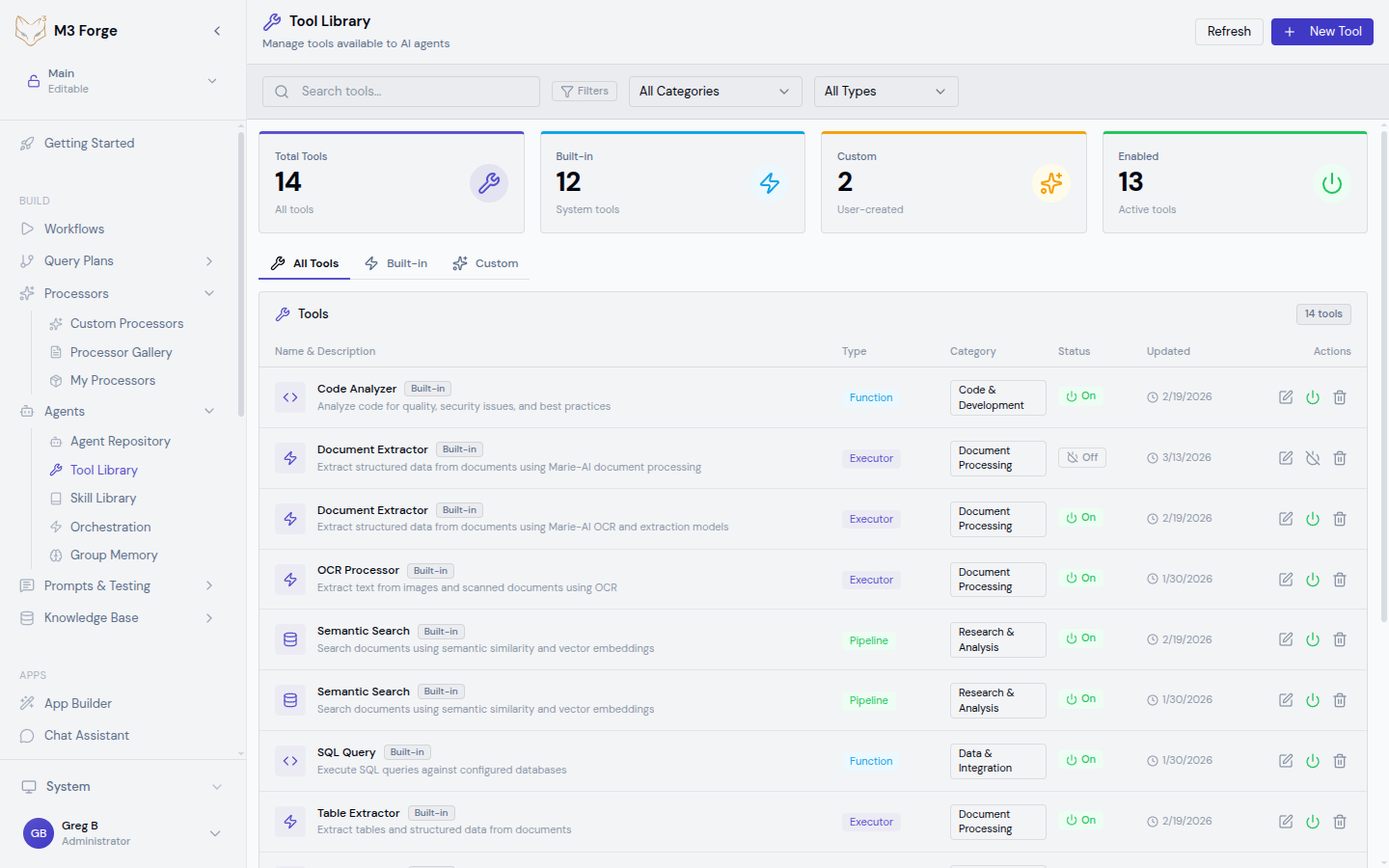
Built-In Tools
M3 Forge includes a library of production-ready tools:
Web & Search
| Tool | Description | Input | Output |
|---|---|---|---|
web_search | Search the web via Google/Bing | Query string | List of results with titles, URLs, snippets |
fetch_url | Retrieve content from URL | URL | Page HTML or text content |
scrape_webpage | Extract structured data from HTML | URL, CSS selectors | Extracted data as JSON |
wikipedia_lookup | Query Wikipedia | Search term | Article summary and full text |
File System
| Tool | Description | Input | Output |
|---|---|---|---|
read_file | Read file contents | File path | Text content |
write_file | Write content to file | Path, content | Success status |
list_directory | List files in directory | Directory path | Array of file names |
delete_file | Remove file | File path | Success status |
Data & Database
| Tool | Description | Input | Output |
|---|---|---|---|
execute_sql | Run SQL query | Query string, connection | Query results as JSON |
query_vector_db | Semantic search | Query text, collection | Relevant documents with scores |
csv_to_json | Parse CSV file | File path | Array of objects |
json_schema_validate | Validate JSON | JSON, schema | Validation result |
Communication
| Tool | Description | Input | Output |
|---|---|---|---|
send_email | Send email via SMTP | To, subject, body | Success status |
post_to_slack | Post message to Slack | Channel, message | Message ID |
create_ticket | Create support ticket | Title, description, priority | Ticket ID |
Computation
| Tool | Description | Input | Output |
|---|---|---|---|
execute_python | Run Python code in sandbox | Code string | Stdout, stderr, return value |
calculate | Evaluate math expression | Expression | Numeric result |
ocr_image | Extract text from image | Image path or URL | Extracted text |
Execution tools (execute_python, write_file) can be dangerous. Assign them only to trusted agents with strict system prompts constraining their use.
Skill Library
Skill Discovery
Skills are auto-discovered from the filesystem. M3 Forge scans configured directories for .skill.md files and loads them dynamically.
Skill file structure:
---
name: research_topic
description: Research a topic using web search and summarization
version: 1.0.0
tools:
  - web_search
  - fetch_url
  - summarize_text
---

# Research Topic

This skill researches a topic by searching the web, extracting content,
and generating a comprehensive summary with citations.

## Steps

1. Search the web for the query
2. Fetch top 5 result URLs
3. Extract main content from each page
4. Summarize all content into a cohesive report
5. Add citations with URLs

## Usage
research_topic(query: “quantum computing applications”)
Built-In Skills
M3 Forge includes starter skills:
Research Skills:
research_topic— Comprehensive web research with citationsfact_check— Verify claims using multiple sourcescompetitor_analysis— Analyze competitor websites and content
Code Skills:
code_review— Review code for bugs, style, securitygenerate_tests— Create unit tests from function signaturesrefactor_code— Improve code quality with suggestions
Data Skills:
data_pipeline— ETL workflow with validationgenerate_report— Create formatted reports from raw datadata_quality_check— Validate data against schema and business rules
Content Skills:
write_blog_post— Generate blog content from outlinecreate_presentation— Build slide deck from key pointstranslate_document— Translate text with context preservation
Custom Skills
Create custom skills by adding .skill.md files to the skill directory:
Create Skill File
Create a new file: skills/my_custom_skill.skill.md
Define Metadata
Add YAML frontmatter:
---
name: my_custom_skill
description: What this skill does
version: 1.0.0
tools:
  - tool_name_1
  - tool_name_2
parameters:
  - name: input_param
    type: string
    description: Parameter description
    required: true
---
Document Steps
Describe the workflow in markdown:
## Steps

1. Do this first
2. Then do this
3. Finally do this

## Logic

- If X, then Y
- Otherwise Z
Implement Logic (Optional)
For complex skills, embed TypeScript/Python:
## Implementation

```typescript
export async function execute(params: SkillParams) {
  const results = await tools.web_search(params.query);
  const content = await Promise.all(
    results.map(r => tools.fetch_url(r.url))
  );
  return tools.summarize_text(content.join('\n'));
}
```
Test the Skill
Reload the skill library to discover your new skill. Assign it to a test agent and verify behavior.
Start with declarative markdown skills before adding code. The LLM can often interpret markdown instructions into tool calls without explicit implementation.
Assigning Tools to Agents
In the Agent Editor
Open Agent Configuration
Navigate to Agents → Select agent → Edit
Click “Add Tools”
The tool library opens in a side panel.
Browse by Category
Tools are organized by category:
- Web & Search
- File System
- Data & Database
- Communication
- Computation
Multi-Select Tools
Check boxes for all relevant tools. Selected tools appear in the agent’s tool list.
Configure Tool Parameters (Optional)
Some tools have configuration:
- API keys for external services
- Database connection strings
- Rate limits
Click the gear icon next to a tool to configure.
Save Configuration
Click “Save Agent”. The agent can now use all assigned tools.
Tool Ordering
Agents try tools in the order they’re listed. Drag and drop to reorder:
- Most frequently needed tools → Top of list
- Fallback tools → Bottom of list
This optimizes response time by trying likely tools first.
Creating Custom Tools
Extend the tool library with domain-specific functions:
TypeScript
// tools/my_custom_tool.ts
import { z } from 'zod';

export const myCustomTool = {
  name: 'my_custom_tool',
  description: 'Does something useful',
  inputSchema: z.object({
    param1: z.string().describe('First parameter'),
    param2: z.number().optional().describe('Optional parameter'),
  }),
  outputSchema: z.object({
    result: z.string(),
    metadata: z.record(z.any()),
  }),
  async execute(input: { param1: string; param2?: number }) {
    // Implementation
    const result = doSomething(input.param1, input.param2);
    return {
      result,
      metadata: { timestamp: new Date().toISOString() },
    };
  },
};

// Register the tool
import { registerTool } from '@marie/core/tools';
registerTool(myCustomTool);Key requirements:
- Define input and output schemas (Zod for TypeScript, Pydantic for Python)
- Provide clear descriptions for each parameter
- Register the tool with
registerTool() - Implement async
execute()method
Once registered, custom tools appear in the tool library and can be assigned to agents.
Tools should be pure functions when possible. Avoid side effects that change global state, as agents may call tools multiple times during reasoning.
Tool Security
Sandboxing
High-risk tools (execute_python, write_file) run in sandboxed environments:
- Restricted file system access (only allowed directories)
- Network isolation (no outbound connections unless whitelisted)
- Resource limits (CPU, memory, execution time)
- Audit logging (all tool calls logged for security review)
Access Control
Restrict tool assignment based on agent trust level:
- Public agents — Web search, Wikipedia, read-only file access
- Internal agents — Database queries, email sending, ticket creation
- Admin agents — Code execution, file write, system commands
Use role-based access control (RBAC) to enforce tool assignment policies.
Input Validation
All tool inputs are validated against schemas before execution. Invalid inputs are rejected with error messages, preventing injection attacks and malformed data from causing failures.
Best Practices
Tool Design
Do:
- Keep tools focused on single responsibility
- Provide detailed parameter descriptions
- Return structured data (JSON) for easy parsing
- Include error handling with informative messages
Don’t:
- Create “Swiss Army knife” tools with too many parameters
- Return unstructured text when JSON is possible
- Assume inputs are valid (always validate)
- Expose sensitive data in output (sanitize first)
Skill Design
Do:
- Break complex workflows into discrete steps
- Document expected behavior in markdown
- Test skills independently before assigning to agents
- Version skills and track changes
Don’t:
- Create monolithic skills that do too much
- Hardcode values (use parameters instead)
- Skip error handling (skills should fail gracefully)
Agent Tool Assignment
Do:
- Assign only necessary tools (minimize attack surface)
- Test tool combinations for conflicts
- Document why each tool is assigned
- Review audit logs for unexpected tool usage
Don’t:
- Give all tools to every agent
- Assume agents will use tools correctly (validate outputs)
- Overlook security implications of powerful tools
Next Steps
- Create your first agent with tool assignments
- Enable group memory to share tool results across agents
- Orchestrate agents to combine skills at scale